

Your voice opens new
possibilities.

A more intuitive way to use your computer, simplify tasks and communicate. Smart technology designed to give more autonomy to different needs.

Windows assistant · voice or text · Android in pilot.

Voice and text commands Floating widget on Windows Audio in your own voice Preview before sending

The cortex that understands your voice.

At the heart of Voz Studio, an intelligence layer turns what you say into action: it listens, understands the context and responds at your pace. The image represents this core: drag to rotate it.

  • Listens — by voice or by text, your way.
  • Interprets — understands the intent behind the command.
  • Responds — carries out the action and confirms before acting.

Technology should adapt to you. Not the other way around.

Everyone has their own way of interacting with the world. Voz Studio aims to expand the possibilities of digital interaction — with respect, clarity and control for the user.

Voz Studio mascot, which accompanies the experience Designed for autonomy

Choose a profile and see how the same technology adapts to each way of interacting.

Less effort to reach and click

Windows navigation tasks can be triggered verbally, in supported flows, reducing physical reach and repeated clicks.

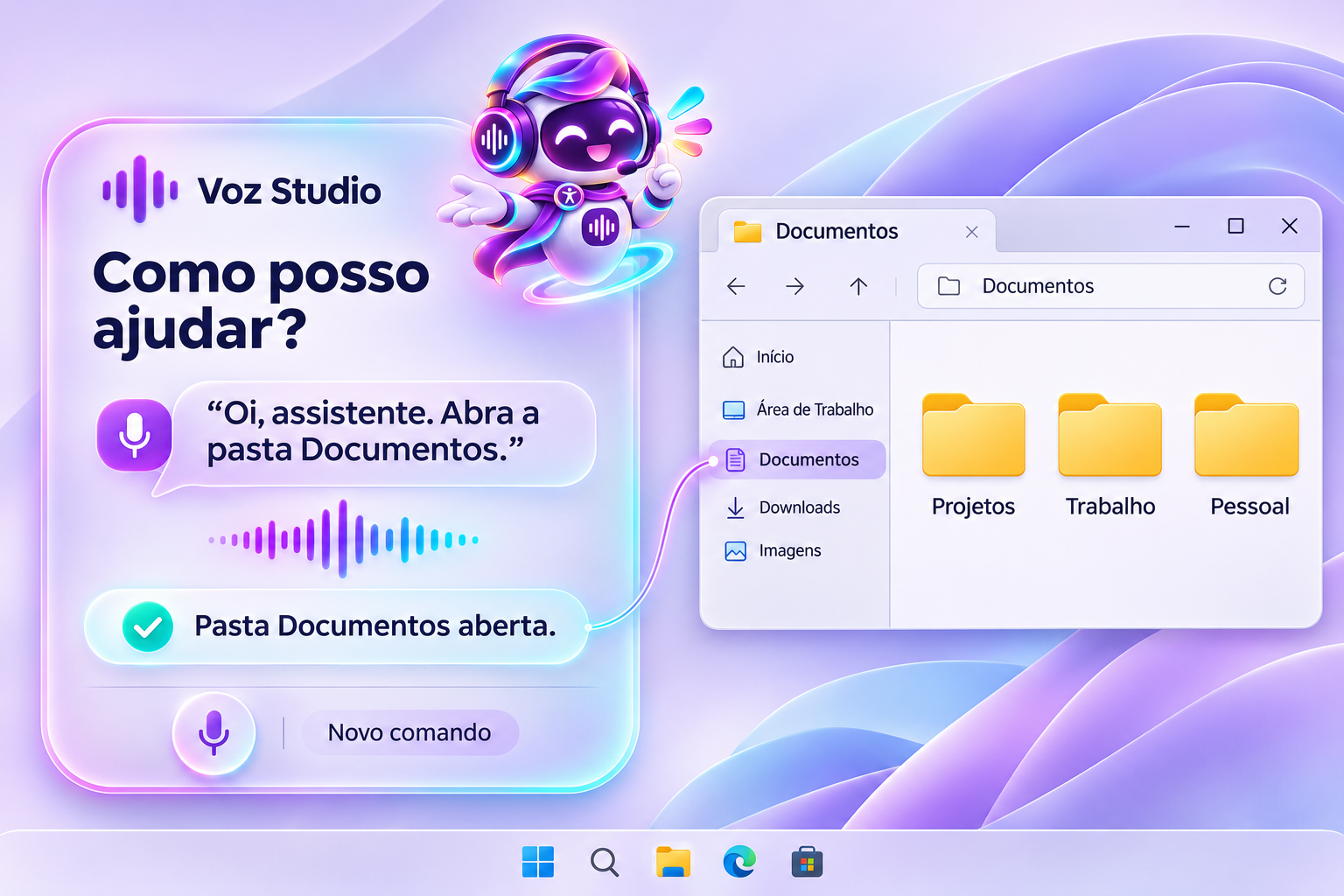
“Open my Documents folder.”

One goal, different ways to interact.

Pick a task and compare the traditional path with the same result requested from Voz Studio. This is an illustrative simulation — not a real run on Windows.

Traditional path

Manual step by step

    With Voz Studio

    You say it, it understands

      Steps are illustrative and may vary with the setup, channel and features installed on your PC.

      See the assistant in action.

      An illustrative recreation of the widget on Windows. Choose a platform and simulate a command to understand the flow, without installing anything.

      Voz Studio illustration: voice command to open Documents, folder opened on Windows and assistant confirmation
      Illustrative recreation of the widget on Windows.

      Windows

      Your assistant within reach of your voice.

      Say “Hi, assistant” with local activation configured, or type a command in the floating widget.

      Fewer steps between you and the task.

      What Voz Studio does today, what is in pilot and what is on the roadmap — with clarity about each stage.

      Available

      Windows control by voice or text

      Open apps and folders and ask for help finding files. When speaking isn't convenient, type the same command in the widget.

      • Open apps and folders on command
      • Floating widget always at hand
      • Voice and text in the same flow
      Available

      Audio in your own voice

      Prepare a message, even in another language, using an authorized voice profile. Listen to the preview and review it before confirming the send in the configured flow.

      • Your own or an authorized voice profile
      • Audio preview before sending
      • You stay in control of the message
      Available

      Favorites by name or nickname

      Call a contact by name, nickname or favorite number. On Windows, sending uses the flow configured for WhatsApp or WeChat, depending on the installed channel.

      • Custom nicknames
      • Flows for WhatsApp and WeChat
      • Reuses your profile and preferences
      Pilot · Android

      Compose from your phone

      On Android, audio composition is presented as a pilot, subject to setup and distribution. iOS is, for now, an experience concept.

      • Android: pilot, depends on setup
      • iOS: concept, version unavailable
      • Desktop is for Windows

      YOUR VOICE IN ANOTHER LANGUAGE

      Write in Portuguese.
      Be heard in Mandarin.

      Send an audio message in the listener's language, with a voice you have authorized. You hear everything first, and nothing goes out without your OK.

      Message to Mom PT 中文
      You wrote

      Oi, mãe! Chego no domingo. Saudade de você.

      Mandarin

      妈妈你好!我星期天到。很想你。

      VoiceYour voice · authorized 0:04
      Listen to preview Confirm sending

      Conversion is a writing aid and may need review. Sending depends on the connected channel and only happens with your confirmation.

      YOUR ROUTINE, YOUR CHOICE

      Fewer steps.
      More possibilities.

      What do you want to do with your voice? Choose your goal and find out where each tool fits.

      Voz StudioCONTROL + COMMUNICATIONIn the same flow

      FOR THOSE WHO WANT BOTH FUNCTIONS

      From a PC command to a message in your voice.

      Control Windows and prepare personalized audio for your conversations in one integrated experience.

      Open my documents. Then prepare an audio message for my contact.

      01 You ask02 You review03 You decide

      App license + API usage billed separately. Integrations depend on setup.

      See the full tool comparison
      ToolFocusWhen it makes sense
      Voz StudioWindows assistant and personalized voice messagesPC control and audio preparation for conversations, in the same flow.
      Windows Voice AccessPC control and dictation built into Windows 11Voice navigation and writing, even offline.
      Apple Voice ControlVoice navigation and interaction on iPhone and iPadControl Apple devices with system commands.
      ElevenLabsVoice synthesis and cloningAudio production and synthesis integration. It is also Voz Studio's voice provider.

      You listen first.
      You decide whether to send.

      Prepare the message, hear how it sounds and confirm sending when it's just right.

      Try the demo

      How sending works

      1. Prepare the message
      2. Hear the preview
      3. Confirm sending

      Before choosing a plan

      Which voice can I use?

      Use your own voice or a profile with explicit permission from the person represented.

      How do I set up sending?

      On Windows, you choose the sending channel and need to install or connect it before use.

      Voice and AI API usage is billed separately by the providers, based on use. Some features require your own account and key. See plans and pricing

      Choose the period that suits you.

      Individual Voz Studio license with your own keys. AI and voice usage is billed by the providers, based on use. Launch prices.

      Monthly

      $27.00

      per month

      Flexible, no long commitment

      • Widget and commands on Windows
      • Favorites and voice preview
      • Flows for WhatsApp and WeChat

      Commercial simulation, no charge.

      Semiannual

      $145.00

      $24.17 per month

      Save $17 vs. monthly

      • Everything in the monthly plan
      • Six months of license
      • Balance between value and term

      Commercial simulation, no charge.

      The license covers the app. APIs, taxes, exchange rates and any paid extensions are extra. Start with the Windows pilot; Android depending on distribution; iOS is a concept. Set up an official channel or checkout before taking orders.

      Frequently asked questions.

      See what the license includes, which devices the app works on and what you need to set up.

      See plans and pricing Still have questions? Talk to us on WhatsApp
      Is AI usage included?

      The license covers Voz Studio. Personalized voice and AI automations may require third-party accounts, keys and credits, billed according to your use.

      Does it work on iPhone?

      The iOS screen is an experience concept. The desktop version is for Windows, and Android is presented as a pilot, subject to setup and distribution.

      Do I need to set up WhatsApp and WeChat?

      Yes. The Windows flow depends on the installed or connected channel and the configured sending method. You can hear the preview and review the message before sending.

      Can I use someone else's voice?

      Only use your own voice profile or one with explicit permission from the person represented. Consent is a requirement to prepare audio.

      Does it replace a screen reader?

      No. Voz Studio offers audio feedback and commands, but does not claim full control nor replace the system's own accessibility features.

      More autonomy with your voice.

      Open apps on Windows with one command and prepare audio messages in your personalized voice.

      WhatsApp